 Norami Docs
Roles
What owners, admins, data managers, and members can do in your workspace.
Every teammate has a role that controls what they can manage. You set someone's role when you invite them, and you can change it at any time.
The roles
| Role | Can do |
|---|---|
| Owner | Created the workspace. Full control, including billing and plan changes. There's exactly one owner per workspace, and ownership can't be reassigned from within the app. |
| Admin | Manage members, departments, and assistants, plus billing settings. |
| Data manager | Upload and refresh data. No member or billing management. |
| Member | Chat with the assistants they can access. Manage their own account only. |
Change someone's role
Open Workspace
Open the menu at the bottom of the sidebar and choose Workspace.
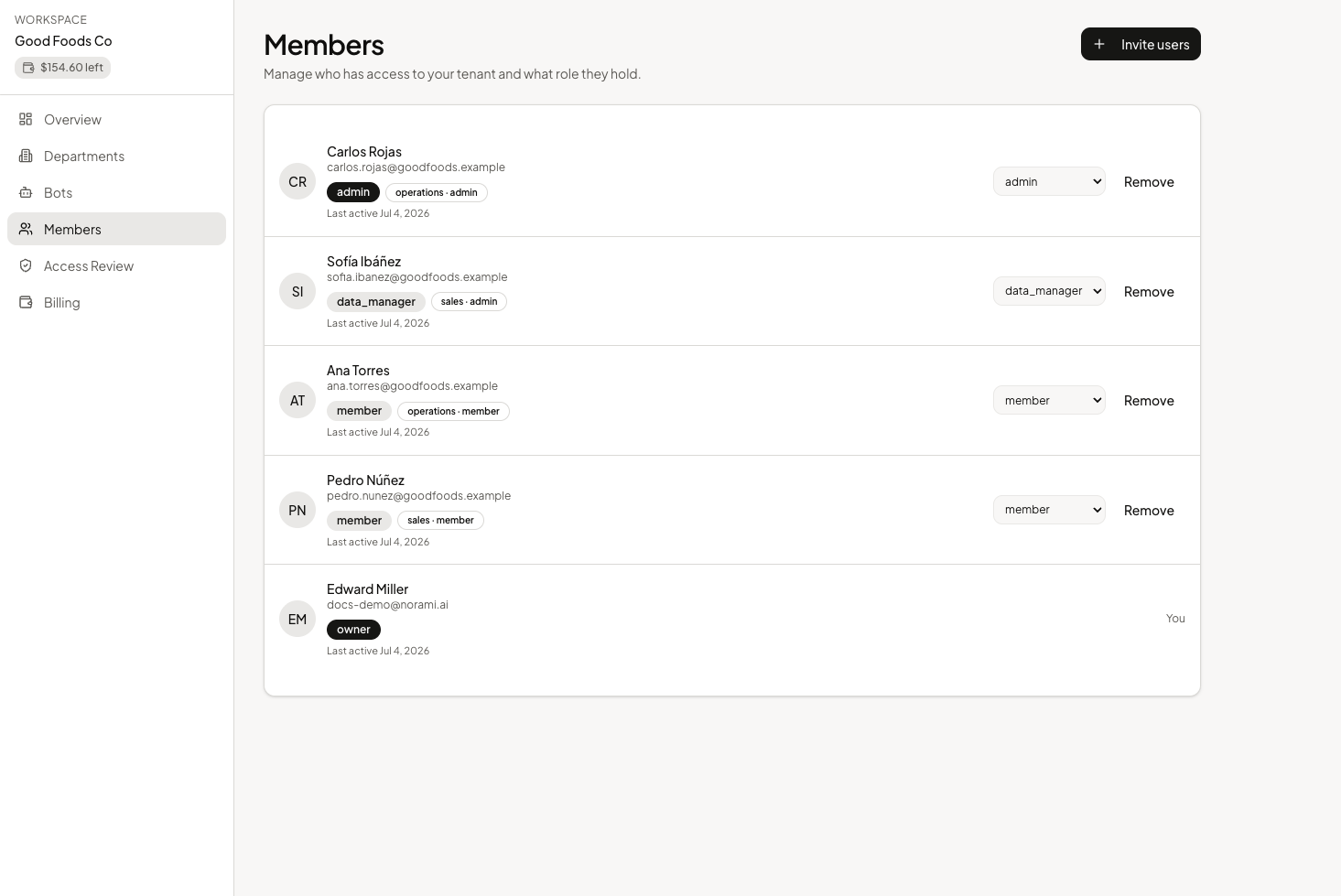
Change the role
Use the role dropdown on their row to pick the new role — the dropdown lists
admin, member, and data_manager. The change saves immediately — there's
no separate save step.
You can't change your own role or the owner's row.
Remove a teammate
Select Remove on their row to take away their access.
Removing a teammate deletes their account in this workspace. Their chats are no longer accessible.
Department roles
Inside a department, people also get a department role — Admin, Data manager, or Member. As the app puts it, "Admins manage the department, data managers can update its data, members can chat." See Departments for how department roles fit alongside workspace roles.